macOS 独立设置应用语言
英文系统下让某些应用的语言是中文,可以通过 defaults 设置:
defaults read查找应用的 bundle IDdefaults write com.apple.Safari AppleLanguages '("zh-Hans-CN")'设置应用语言为中文
cURL Notes
curl -c cookie.txt URL: save cookies to cookie.txtcurl -b cookie.txt URL: read cookie from cookie.txt and put into requestcurl -H 'User-Agent: FakeUA' URL: set HTTP headercurl -I URL: show header onlycurl -L URL: follow 30x redirectcurl -o new_name/-O URL: save response to filecurl -X POST --data "data=xxx" URL: POST data to URLcurl -w "@curl-format.txt" URL: format details of request, which you can use this to timing request:
➜ cat curl-format.txt
    time_namelookup:  %{time_namelookup}\n
       time_connect:  %{time_connect}\n
    time_appconnect:  %{time_appconnect}\n
      time_redirect:  %{time_redirect}\n
   time_pretransfer:  %{time_pretransfer}\n
 time_starttransfer:  %{time_starttransfer}\n
                    ----------\n
         time_total:  %{time_total}\n

➜ curl -w "@curl-format.txt" -o /dev/null -s https://fann.im
    time_namelookup:  0.015
       time_connect:  0.015
    time_appconnect:  0.329
      time_redirect:  0.000
   time_pretransfer:  0.329
 time_starttransfer:  0.377
                    ----------
         time_total:  0.377
30
而立。
Converting MyISAM to InnoDB
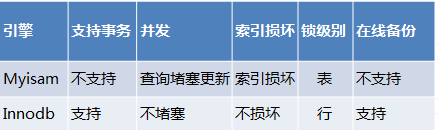
如果数据量小且不在服务中,可以直接修改表结构:
ALTER TABLE table_name ENGINE=InnoDB;
然后现实是需要迁移表的数据量往往很大,不好直接 ALTER。一个办法是导出-修改表结构-导入,需要修改的有表名,engine,导入后重命名新/旧表。需要注意的是 mysqldump 默认有 DROP TABLE 命令,需要去掉,不然导入时候会直接删掉旧表。
还有一个方法是按照旧表结构新建表,将数据从旧表导入新表:
CREATE TABLE innodb_table LIKE mytable;
ALTER TABLE innodb_table ENGINE=InnoDB;
INSERT INTO innodb_table SELECT * FROM mytable;
数据量大的话可以事务处理:
START TRANSACTION;
INSERT INTO innodb_table SELECT * FROM mytable WHERE id BETWEEN x AND y;
COMMIT;
数据验证完整后重命名:
RENAME TABLE mytable TO mytable_old, innodb_table TO mytable;
//DROP TABLE mytable_old;
XDG Base Directory
XDG 是 X Desktop Group 的简称,现在叫 Freedesktop.org,致力于推动 *nix 桌面环境的标准规范化。其中 XDG Base Directory 定义了文件配置基本目录:
$XDG_CONFIG_HOME是配置文件目录,默认$HOME/.config$XDG_DATA_HOME是用户文件的基本保存目录,默认$HOME/.local/share$XDG_DATA_DIRS定义$XDG_DATA_HOME以外的文件基础目录,是一个有序目录集合,默认/usr/local/share/:/usr/share/$XDG_CONFIG_DIRS同理,是扩展的配置文件目录,默认/etc/xdg,需要注意的是目录顺序很重要,$XDG_CONFIG_HOME优先级最高$XDG_CACHE_HOME缓存目录,默认$HOME/.cache$XDG_RUNTIME_DIR指定非必需运行时文件保存目录
Neovim 支持 XDG Base Directory,配置文件是 $HOME/.config/nvim/init.vim,shada 文件在 $HOME/.local/share/nvim.
Verify SSL certificate and key
You can use OpenSSL to verify whether a SSL certificate and a key is matched:
openssl x509 -noout -in certificate.crt | openssl md5
openssl rsa -noout -in privateKey.key | openssl md5
openssl req -noout -in CSR.csr | openssl md5
If both commands return same hash, the certificate and key is matched.

Fix "Enter passphrase for key" on macOS
You will be asked ‘Enter passphrase for key’ when doing SSH operation:
Enter passphrase for key ‘/Users/fannheyward/.ssh/id_rsa’:
On macOS you can fix this by ssh-add -K.
pushd / popd
cd - can goto last directory that you just leave, - means $OLDPWD. This only support one directory.
pushd / popd / dirs works on multiple directories, as a directory stack:
pushd [dir1] # add dir to stack
popd [dir1] # pop dir from stack
dirs # list stack
dirs -c # cleanup stack